
Aura
Aura is a shipped internal AI assistant I worked on during my final project at Apple. It was built for the DevOps team to help engineers find trusted queries faster, understand what they do, and work safely with sensitive internal data.
Role
Lead Product Designer
Tools
Figma | Sketch
Team
Devops
Duration
4 years

Aura
Senior UX Designer
Aura was an internal AI assistant built for the DevOps team at Apple.
The product helped engineers retrieve trusted queries faster instead of searching through docs, dashboards, tickets, Slack threads, saved scripts, and team knowledge.
The first use case was focused on DevOps, but the assistant was designed in a way that could later be embedded into other Apple internal web applications where engineering teams needed help finding trusted queries, understanding data, or working through complex internal workflows.
Since I rolled off shortly after this project shipped, I did not get to see the full long-term impact. So this case study focuses on the problem, design process, shipped experience, and the product decisions that made Aura useful, secure, and scalable.
My role included:
-
Product design
-
UX strategy
-
Interaction design
-
DevOps workflow mapping
-
AI assistant patterns
-
Secure data UX
-
Prototyping
-
Design system thinking
-
Engineer handoff
The Starting Point
The DevOps dashboard already helped engineers understand what was happening across systems.
It showed things like:
-
System health
-
Alerts
-
Service status
-
Deployments
-
Activity history
-
Infrastructure metrics
-
Requests
-
Security-related states
This gave teams a strong starting point, but seeing an issue was only the first step.
Once an engineer noticed something, they still had to find the right query to investigate it.
That query might live in a doc, an old ticket, a shared dashboard, a Slack thread, a saved script, or someone’s memory.
So even though the dashboard showed the signal, the next step was still slower than it needed to be.

Problem
The Challenge
DevOps engineers often need to move fast.
When an alert appears, a service needs to be checked, or a data request comes in, engineers need the right query quickly.
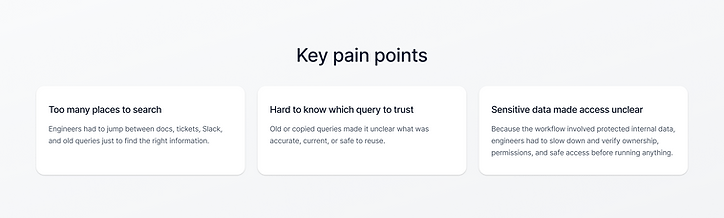
Before Aura, query knowledge was spread across too many places:
-
Internal docs
-
Old tickets
-
Saved dashboards
-
Slack threads
-
Shared folders
-
Previous investigations
-
Personal notes
-
Team knowledge
The hard part was not always writing a new query from scratch.
The hard part was finding the right existing query and knowing if it was safe, current, and approved to use.
This mattered even more because many queries touched sensitive internal data.
A query without the right context could slow teams down, create confusion, or expose information that needed to stay protected.

The Design Challenge
The main question was:
How might we help DevOps engineers find trusted queries faster while protecting sensitive internal data?
Aura could not behave like a normal chatbot.
A normal chatbot might give a quick answer, but engineers need more context before using a query.
They need to know:
-
What the query does
-
What system or dataset it touches
-
Who owns it
-
When it was last updated
-
Whether it touches sensitive data
-
Whether they have permission to use it
-
What action is safe to take next
So the experience needed to be fast, clear, secure, and easy to trust.

Why This Needed to Be Embedded
Aura was built for the DevOps team first, but the interaction pattern needed to be flexible.
The assistant could not feel like another separate destination that engineers had to open and manage.
It needed to show up inside the internal web applications where engineers were already working.
That meant Aura needed to work as an embedded assistant pattern that could live inside different Apple internal tools over time.
For this project, the shipped use case was DevOps query retrieval.
The larger design opportunity was creating an assistant pattern that could later support other internal engineering workflows where teams needed to:
-
Search across internal knowledge
-
Retrieve trusted queries
-
Understand sensitive data
-
Get workflow guidance
-
Take safe next steps
Understanding the Workflow
I started by looking at the DevOps workflow around query retrieval.
A common flow looked like this:
-
An alert, issue, or request comes in
-
The engineer needs to investigate
-
They search for an existing query
-
They check if the query is still valid
-
They confirm what data it touches
-
They make sure they have permission
-
They run the query in the approved tool
-
They decide what to do next
The biggest opportunity was not to replace the tools engineers already used.
The opportunity was to bring query retrieval closer to the moment engineers needed it.

Research & Discovery
The discovery work focused on understanding where DevOps engineers lost time and where sensitive data created risk.
I looked at questions like:
-
What happens when an engineer needs a query?
-
Where do engineers search for queries today?
-
What makes a query trustworthy?
-
What context does an engineer need before using it?
-
What should Aura hide or limit by default?
-
When should users request access instead of seeing the full query?
-
How could this assistant pattern fit into an internal web application without disrupting the workflow?
A few patterns became clear:
-
Engineers often reused old queries
-
Query knowledge was spread across tools and teammates
-
Some queries touched sensitive internal data
-
A query without context was not enough
-
Speed mattered, but safety mattered just as much
-
The assistant needed to feel embedded, not separate
The key insight was:
DevOps engineers did not just need faster search. They needed a safer way to retrieve trusted queries inside the workflow they were already using.

Why AI Made Sense
AI made sense because engineers did not always know the exact query name.
They might know the issue, system, service, dataset, or result they needed, but not where the query lived.
Instead of forcing engineers to remember exact keywords, Aura allowed them to ask in plain language.
Example:
“Show me the query to check recent failed jobs for this service.”
Or:
“Find the approved query for investigating high memory usage.”
Aura could return the most relevant trusted query, along with the context needed to use it safely.
This made the assistant useful because it matched how engineers naturally described their work, not just how queries were named in a system.

Concept Exploration
Option 1 — Central Query Library
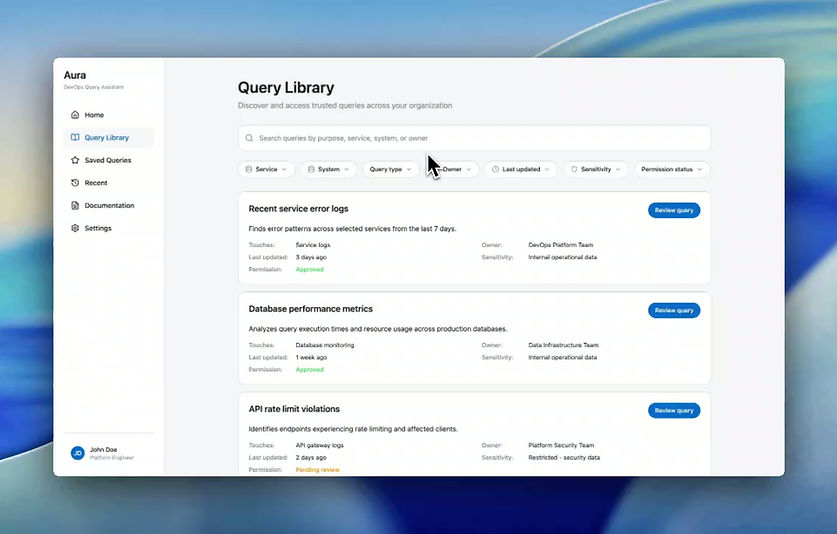
One idea was to create a dedicated query library. This made query search more organized, but it still forced engineers to leave their workflow. It helped with storage, but not enough with speed during active work.
Option 2 — Generic Chat Assistant

Another idea was a basic AI chat experience. This made asking questions easier, but it felt too generic. If Aura only returned a query without context, engineers would still need to verify if it was current, approved, and safe. That was not strong enough for sensitive internal data.
Option 3 — Embedded Query Assistant
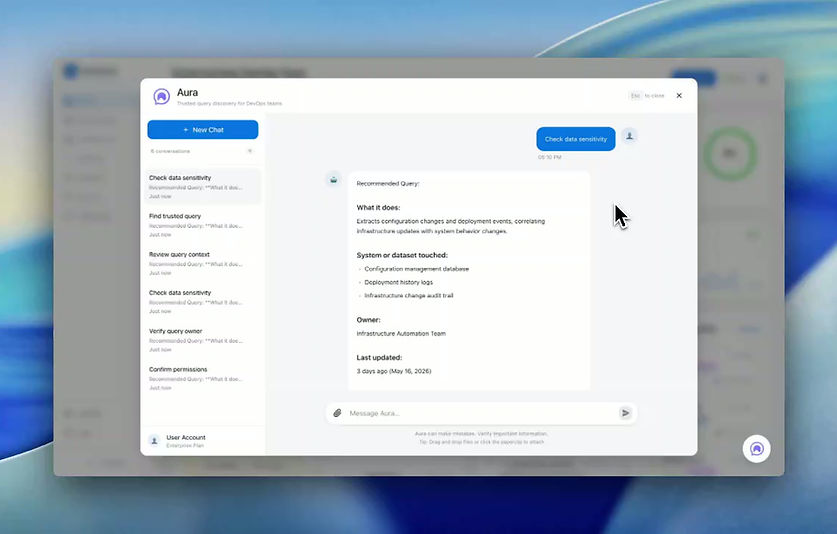
The strongest direction was an embedded query assistant. Aura could live inside the DevOps tool and return a trusted query based on what the engineer was trying to investigate.
Instead of just returning code, Aura showed:
-
Recommended query
-
Plain-language explanation
-
Owner or team
-
Last updated date
-
Data sensitivity level
-
Permission status
-
Related queries
-
Safe next steps
This gave engineers speed while keeping the right safety checks in place.
What Makes Aura Different
Aura was not designed to be a general chatbot. It was designed to help DevOps engineers move from question to trusted query faster.
A generic chatbot gives an answer. Aura helps an engineer understand whether that answer is safe to use. The difference was the context around the query.
Aura was designed around:
-
Embedded workflows
-
Query trust
-
Permissions
-
Sensitive data handling
-
DevOps speed
-
Clear explanations
-
Safe actions
-
A pattern that could scale to other internal web apps
The goal was not to make AI feel magical. The goal was to help engineers do the right thing faster and with more confidence.
Key Design Decisions
1. Make Aura Feel Embedded, Not Separate
Aura needed to support the DevOps workflow without becoming another place engineers had to go.
I designed the assistant as an embedded pattern that could appear inside the internal web app and support the task at hand.
This helped engineers stay in context while looking for a query.
2. Connect Aura to the Current Context
A generic assistant would make users explain everything from scratch.
Aura was designed to use the context around the user.
Inside the DevOps workflow, that could include:
-
Selected service
-
Alert type
-
System area
-
Current request
-
Deployment
-
Related logs or metrics
This reduced the work needed to start an investigation.
3. Show Context With Every Query
A raw query by itself is not enough.
Engineers need to know what the query does and whether it is safe to use.
So I designed the query result card to include:
-
Query title
-
Short explanation
-
System, service, or dataset
-
Owner or team
-
Last updated date
-
Sensitivity level
-
Permission status
-
Common use case
This made the result easier to scan and easier to trust.
4. Make Permissions Clear
Because Aura handled sensitive data, permissions had to be visible in the UI.
I designed different access states:
-
Full access: the engineer can view and use the query
-
Limited access: the engineer can see a summary, but sensitive parts are hidden
-
Blocked access: the engineer does not have permission
-
Request access: the engineer can start the right approval flow
This helped Aura stay useful without exposing sensitive data to the wrong person.
5. Keep Actions Safe
Aura was designed to guide engineers, not blindly automate risky work.
The main actions were controlled and clear:
-
Copy query
-
Open in approved tool
-
View related queries
-
Request access
-
Ask owner
-
Save query
For sensitive workflows, Aura should help the user move faster while keeping the user in control.
Final Shipped Experience
Aura shipped as an internal Apple product for the DevOps team.
The final experience allowed engineers to open Aura from the internal web app, ask for a query in plain language, and review a trusted result with the right context around it.
The experience supported:
-
Natural language query search
-
Context-aware query suggestions
-
Trusted query recommendations
-
Query explanations
-
Permission-aware responses
-
Sensitive data warnings
-
Related query suggestions
-
Safe next actions
-
Access request flows
-
An embedded pattern that could be reused in other internal web apps
Instead of forcing engineers to search across multiple tools, Aura brought query retrieval closer to the moment they needed it.
Designing for Sensitive Data
Because Aura worked with sensitive internal data, the UI had to be careful and clear.
The assistant could not feel like a black box that shows anything to anyone.
I designed the experience around visible safety cues:
-
Data sensitivity labels
-
Permission status
-
Hidden or masked fields
-
Access request flows
-
Clear blocked states
-
Short reasons when information is limited
-
Safe default actions
The goal was to make the secure path feel natural, not annoying.
Launch & Handoff
Aura shipped internally as my final project at Apple.
Since I rolled off shortly after launch, I did not get to see the full long-term impact or adoption data. Because of that, I am careful not to overstate the results.
What I can speak to is the work I helped deliver:
-
A shipped internal AI assistant for the DevOps team
-
A faster query retrieval experience
-
A safer way to show sensitive query context
-
Permission-aware interaction patterns
-
Reusable components for future internal web app embedding
-
Prototypes and handoff support for engineering
Expected Impact
Because I left shortly after Aura shipped, I did not have access to long-term metrics.
The expected value of the product was focused on:
-
Reducing time spent searching for queries
-
Making trusted queries easier to find
-
Helping engineers understand what a query does
-
Supporting safer use of sensitive data
-
Making permissions clearer in the workflow
-
Reducing dependency on tribal knowledge
-
Bringing query retrieval closer to the tools engineers already used
-
Creating an assistant pattern that could be reused in other internal web applications

What I Learned
This project helped me think deeper about designing AI for real internal workflows.
The biggest lesson was that AI is only useful if people can trust it.
For DevOps teams, speed matters, but safety matters just as much.
Aura was not about making a flashy chatbot.
It was about helping engineers go from question to trusted query faster, understand what they were using, and protect sensitive data along the way.
It also taught me the importance of designing AI as a reusable product pattern, not just a one-off feature.
Even though the first shipped version focused on DevOps, the design had to be flexible enough to support future internal web applications.